Personal Project · 2026
Design Prompt Builder
Automating System Prompt Generation for UI/UX Design
Role
Product Designer & Front-End Developer
Year
2026
Stack
Alpine.js · Tailwind CSS · Vanilla HTML
Overview
Executive Summary
Design Prompt Builder is a reactive, single-page tool built to eliminate the repetitive overhead of writing AI design prompts from scratch. By structuring inputs across project basics, strategy, design style, and content — it outputs a complete, ready-to-paste system prompt in real-time, ensuring consistent, high-quality results every session.
The Challenge
Repetitive Prompts & Inconsistent Results
Every new client project meant writing a fresh AI prompt from memory. The process was slow, error-prone, and produced wildly inconsistent outputs depending on what was remembered to include that day.
- Writing the same boilerplate prompt context for every new client project
- Forgetting to include key design constraints like border radius or shadow depth
- Inconsistent results when prompt structure varied between sessions
- Time lost context-switching between the brief, the AI tool, and design decisions
- No standard way to communicate emotional tone and colour strategy to an AI
"Prompt Drift" — the gradual degradation in AI output quality caused by inconsistent, freeform prompting across sessions.
The Solution
A Structured Prompt Engine
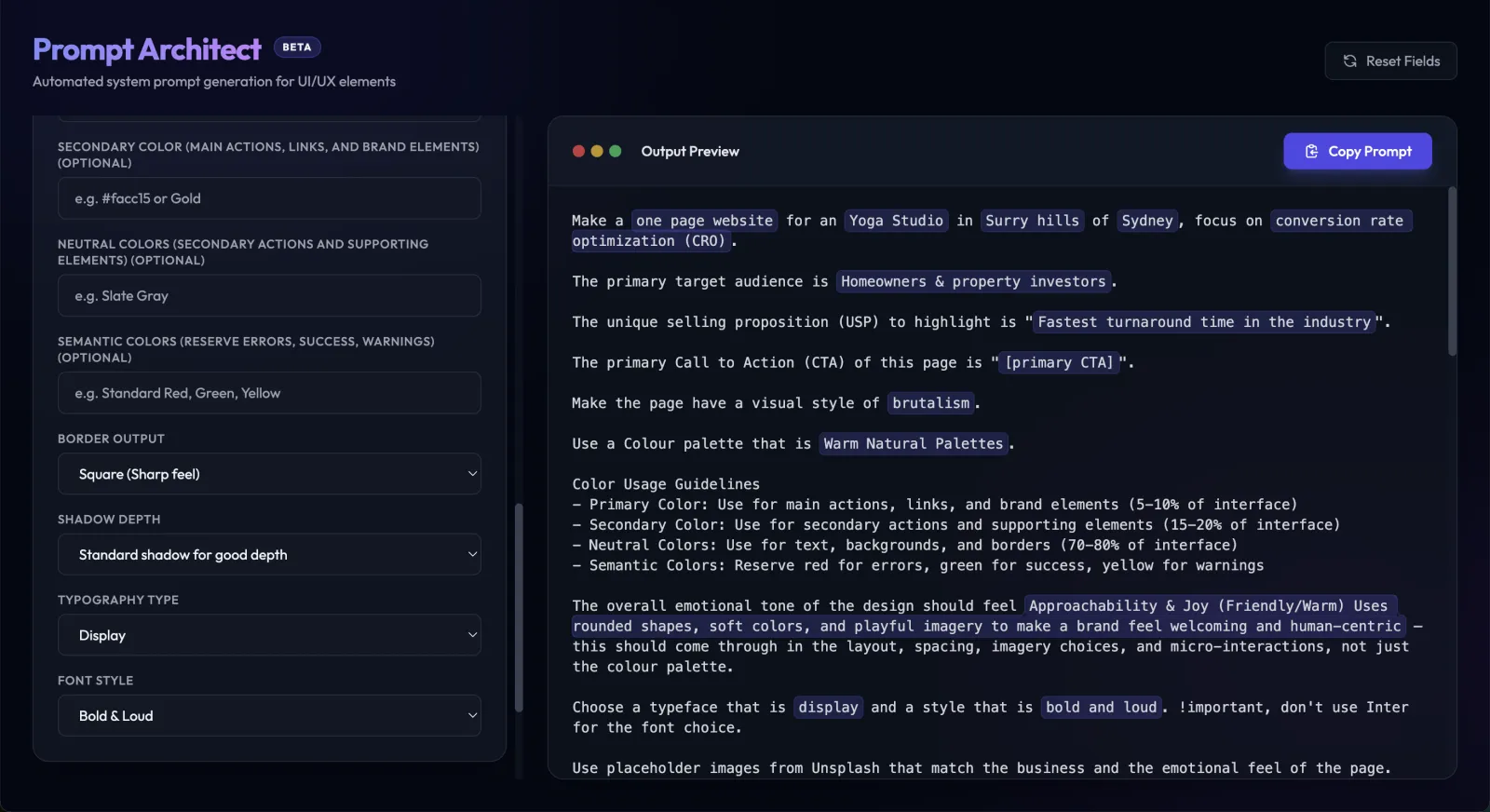
Design Prompt Builder replaces freeform prompt writing with a guided, form-driven interface. Every design decision — from emotional tone to shadow depth — is captured and assembled into a single, structured prompt that an AI can reliably act on.
Project Basics
Define page type, business name, suburb and city to ground every prompt in real-world context.
Strategy Layer
Select a strategy focus (CRO, SEO, Lead Gen), target audience, and unique selling point to shape intent.
Design & Vibe
Choose design style, emotional tone, colour palette, border radius, shadow depth, and typography — all with custom overrides.
Included Sections
Toggle the exact page sections needed (Hero, Features, Testimonials, FAQ, etc.) and they're woven into the output automatically.
Content Strategy
Set primary and secondary CTAs, phone numbers, and copywriting approach, from placeholder copy to exact content.
Live Preview
The generated prompt updates in real-time as you fill in the form — copy to clipboard in one click.
Design
Key Design Decisions
Premium Dark UI
Built with Glassmorphism panels, brand gradient accents, and subtle fade-in animations — the UI feels as considered as the prompts it produces. It's a tool you enjoy using, not just a utility.
Zero-Latency Reactivity
Powered by Alpine.js, the prompt preview updates on every keystroke and dropdown change — no submit button, no page reload. The right panel is always in sync with the left, giving instant feedback as the brief takes shape.
Custom Override Pattern
Every dropdown includes a "Custom" escape hatch — when selected, a free-text input slides in, replacing the dropdown. This keeps the interface fast for common cases while remaining fully flexible for edge cases.
Collapsible Sections
The form is grouped into collapsible accordion panels — Project Basics, Strategy, Design & Vibe, Sections, and Content. Only what's relevant is open, keeping the interface clean and focused without sacrificing depth.
Engineering
Technical Architecture
Intentionally zero-dependency. The entire app is a single HTML file — no build step, no npm install, no framework overhead. It runs anywhere a browser exists.
Reactivity
Alpine.js 3
CDN · No build
Styling
Tailwind CSS
CDN · Dark mode
Server
npx serve
Static · Port 3000
Form Inputs  ──── Alpine x-model ────▶  Reactive State
                                                     │
                              ┌──────────────────────┤
                              ▼                      ▼
                    generatedPrompt         highlightedPrompt
                    (plain text)            (syntax highlighted)
                              │
                              ▼
                    Copy to Clipboard  ──▶  AI Tool
Impact
The Result
Design Prompt Builder transforms a fragmented, memory-dependent task into a structured 30-second workflow — producing better AI outputs with less effort, every single time.
- 30 seconds from blank form to a complete, AI-ready design prompt.
- Consistent structure across every project — no more forgotten constraints or vague tone instructions.
- Zero dependencies — runs as a static file, served locally via the Launch Local dashboard.
💡 Pro Tip: Keep Design Prompt Builder open as a pinned tab at the start of every new client brief — fill it in as you read the brief, and your AI prompt is ready before you've even opened the AI tool.
Last updated · June 2026