6Nutrition · 2026
6Nutrition Online Ordering
Pickup-First Ordering for a Melbourne High-Protein Cafe
Role
Product Designer & Full-Stack Developer
Year
2026
Stack
Next.js 16 · App Router · React 19 · Tailwind CSS · shadcn/ui · Stripe · Vercel
Overview
Executive Summary
6Nutrition Online Ordering is a pickup-first ordering experience built for a Melbourne high-protein cafe. It replaces phone orders and queue-time ordering with a fast, modifier-aware web app that hands money to Stripe, surfaces orders to the kitchen in real time, and reconciles every payment via webhook plus a safety-net cron — all deployed on Vercel.
The Challenge
Phone Orders, Queues, and Lost Modifiers
Like most cafes, 6Nutrition was juggling phone orders, in-person queues and a menu rich with required preparation choices, extras and add-ons. Handwritten dockets dropped modifier details, peak-time phone calls pulled staff off the counter, and customers waited in line just to place an order — not to collect one.
- Phone orders interrupting service and creating handwritten dockets
- No reliable way to capture complex modifier choices (preparation, sides, extras)
- Customers waiting in queue just to order, not to pick up
- Inconsistent pickup timing — no visibility for the kitchen on what's coming next
- No GST-compliant digital receipt trail for retail items
"Modifier Drift" — every handwritten docket loses a preparation choice or a side. Multiply by hundreds of orders a week and the kitchen is always guessing.
The Solution
A Pickup-First Web App
A Next.js 16 App Router build with a structured JSON menu, modifier-aware modals, a persistent cart drawer, Stripe Checkout, and a dedicated kitchen view. Every decision — from required-modifier validation to the reconcile cron — exists to make sure every paid order reaches the kitchen exactly as the customer chose it.
Structured Menu Engine
A JSON-driven menu with categories, modifier groups, shared add-ons, allergens and dietary tags — all resolved server-side so the menu is fast, cacheable, and never stale.
Modifier-Aware Item Cards
Every item opens a modal with required choices, multi-select extras, min/max validation and live price recalculation as the customer customises their order.
Persistent Cart Drawer
A fixed top-right cart pill that follows the customer through the menu, opening a side drawer with quantity controls, pickup-time selection, and customer details.
Stripe Checkout
Server-side Stripe Checkout session creation with line items, modifier descriptions and pickup metadata — handing off to Stripe's hosted, PCI-compliant payment flow.
Webhook + Reconcile Cron
A Stripe webhook captures completed sessions and a reconcile route catches anything missed, so the kitchen view never loses a paid order — even if a webhook is dropped.
Kitchen View
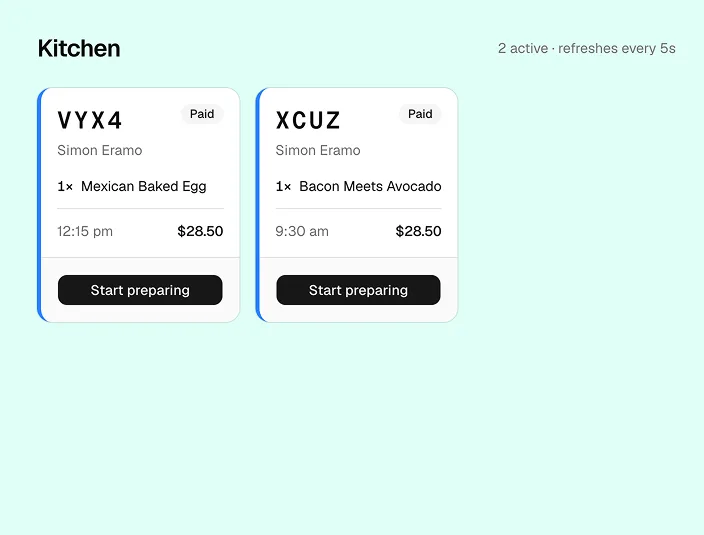
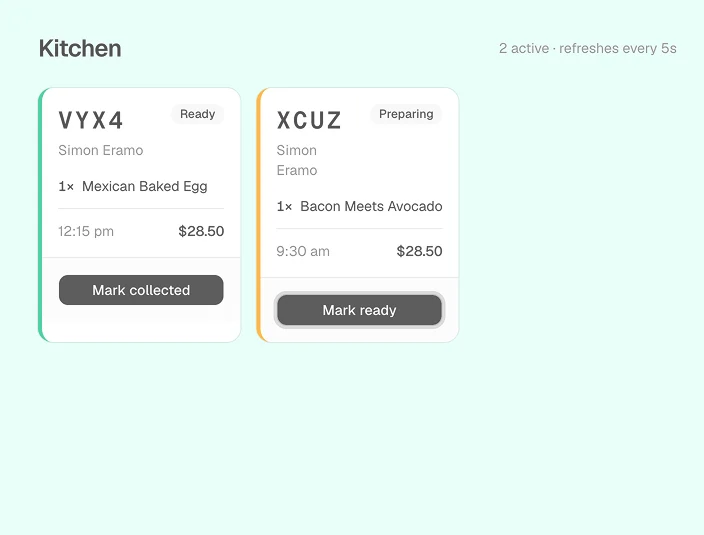
A dedicated /kitchen screen displays paid orders with customer name, phone, pickup time and itemised modifiers — designed to be glanceable on a counter tablet.
Design
Key Design Decisions
Pastel-Mint Brand Palette
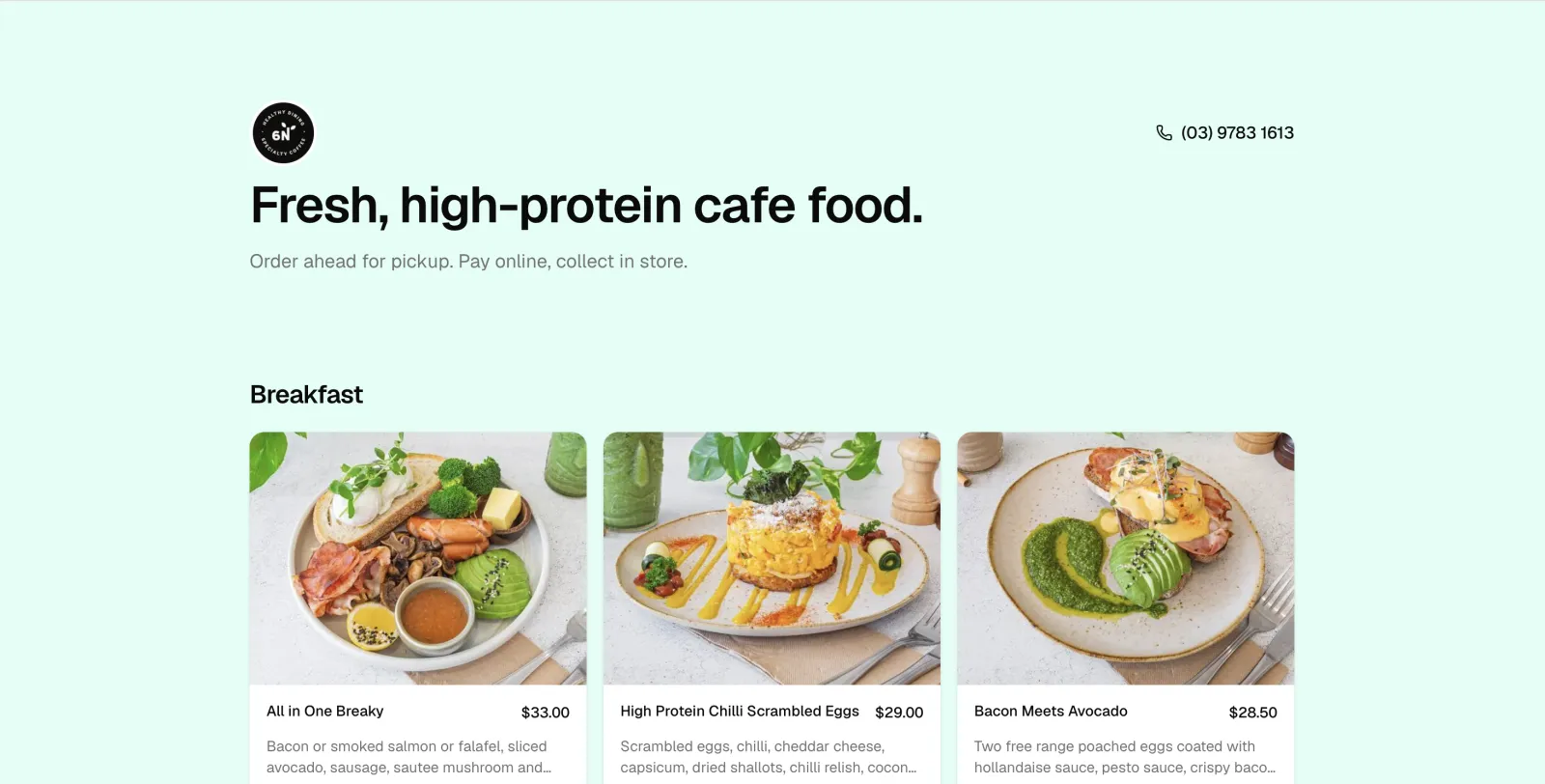
A soft mint background paired with a circular brand mark and high-contrast black/white interactive elements — the menu feels fresh and "healthy" without ever competing with the food photography.
Modifier-First Item Cards
Every card opens a dialog rather than quick-adding — even simple items — so customers always confirm required choices and the cart never ends up with an "incomplete" line item.
Persistent Top-Right Cart
A fixed cart pill shows item count and running total at all times — no scroll-to-bottom moment of doubt. Tapping it slides in a full-height drawer with quantity controls and a pickup-time selector.
Photo-Backed Menu with Graceful Fallback
Items with photography render edge-to-edge imagery via next/image; items without fall back to a category-coloured placeholder —
so the grid never looks half-finished while photo coverage rolls
out.
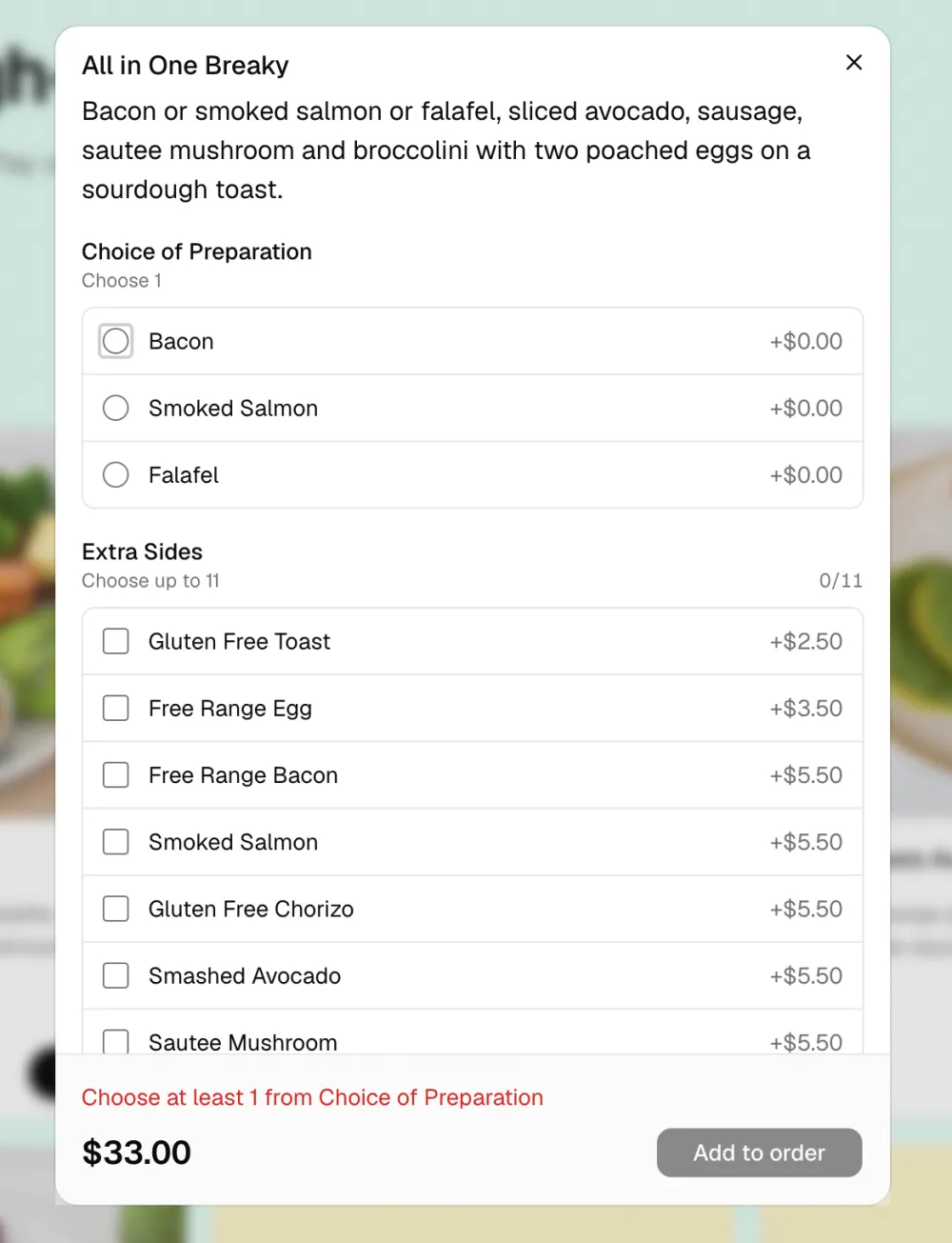
The customise-item modal: required choices, multi-select extras, live validation and a sticky total.
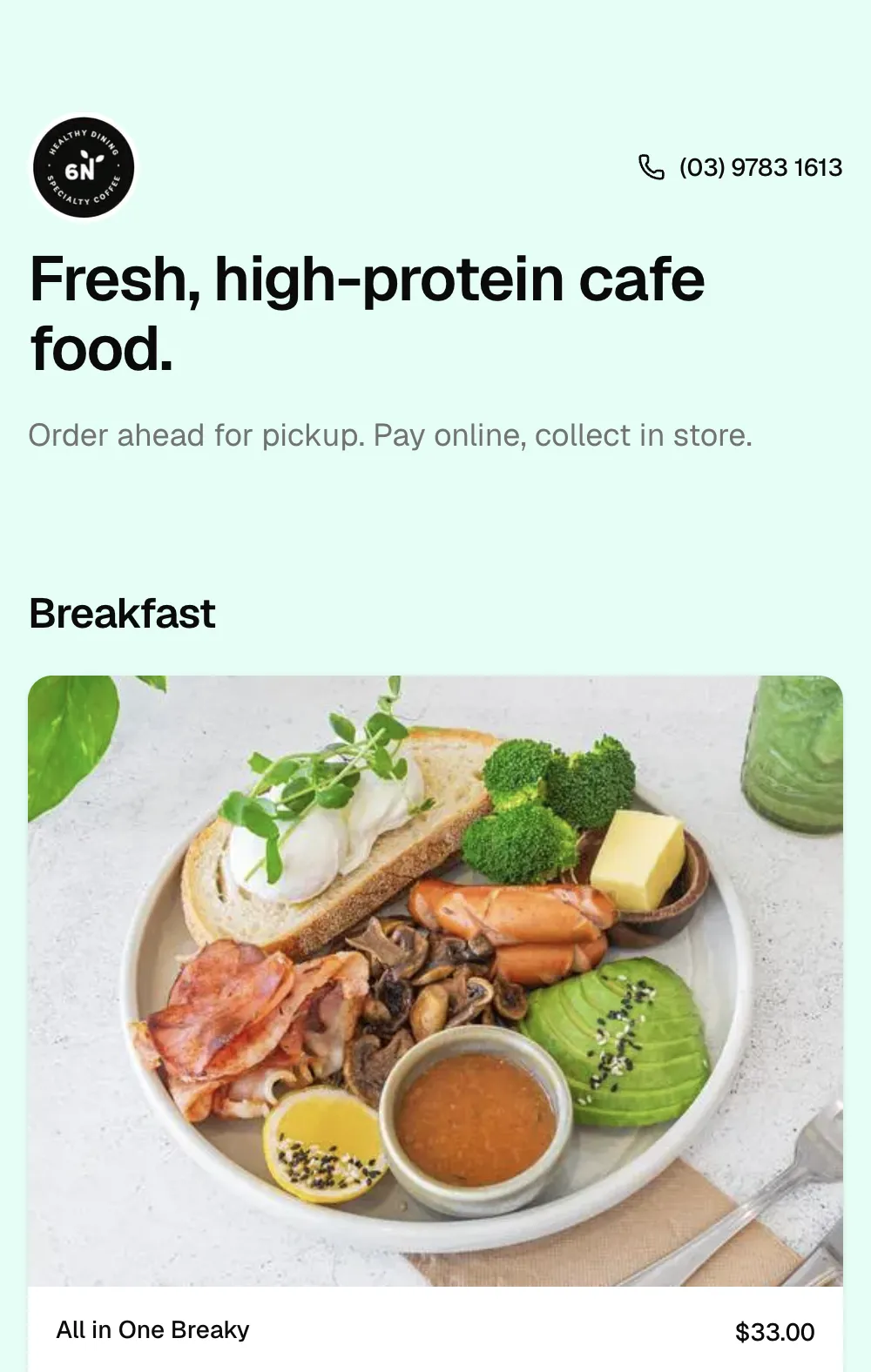
The same ordering flow on mobile: a single-column, thumb-friendly menu that keeps food photography and pricing front and centre.
Engineering
Technical Architecture
Built on Next.js 16 App Router and deployed on Vercel. The menu is a single JSON document resolved server-side; the cart lives in client state; checkout and webhooks run as Vercel Functions backed by Stripe.
Framework
Next.js 16
App Router · RSC
Payments
Stripe
Checkout · Webhooks
Hosting
Vercel
Fluid Compute · Edge
menu.json ──▶ getMenu() ──▶ RSC Page ──▶ MenuItemCard
                                                              │
                                                              ▼
                                                       Cart (client)
                                                              │
                                                              ▼
                                                  /api/checkout
                                                              │
                                                              ▼
                                                       Stripe Checkout
                                                              │
                                              ┌───────────────┴───────────────┐
                                              ▼                               ▼
                                /api/stripe/webhook      /api/cron/reconcile
                                              │                               │
                                              └─────────────▶ /kitchen ◀─────────────┘
Real-time
From Checkout to Kitchen
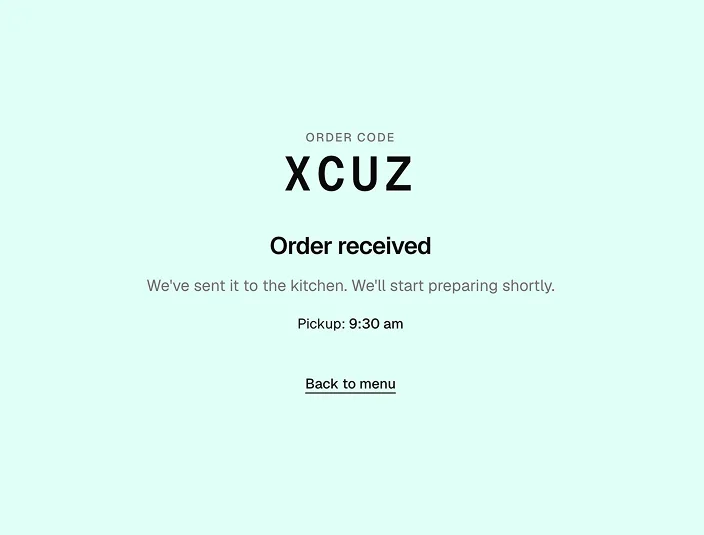
A paid order hands the customer a short pickup code and drops a live ticket onto the kitchen dashboard. Staff move each ticket from preparing to ready to collected, and the board refreshes itself every few seconds — no hardware, no app to install.
Impact
The Result
6Nutrition customers can browse, customise and pay for pickup in under a minute — without taking up counter time or risking a missed modifier. The kitchen sees exactly what was ordered, when it's due, and who it's for.
- Under a minute from landing page to a paid, scheduled pickup order.
- Zero phone orders to transcribe — every modifier choice is captured, priced and ticketed automatically.
- Reliable order capture via Stripe webhook + a reconcile cron — paid orders never get lost in transit.
💡 Pickup-first, not delivery-first: by deliberately scoping out delivery, the build stays simple, the margins stay healthy, and the customer experience is tuned for the cafe's actual workflow.
Last updated · June 2026